Department documents
We prepare the academic and methodological documents for a course. Each one is an editable Word file, ready for your department paperwork.
Which document do you need?
Programme documents
The course-level programme paperwork submitted to the department.
Syllabus
Oʻz DSt 3556:2021 §9.2.4Also required under the title «Ishchi fan dasturi (Sillabus)»
The syllabus must be ready for the department meeting
Course program
Oʻz DSt 3556:2021 §9.2.3–9.2.4The course programme must be approved by a Council protocol
Qualification practice programme
CoM Resolution No. 11 (2024)The programme must be approved before students leave for practice
Session materials
Lecture texts and handouts you take into the classroom.
Methodological guide
Nizom No. 1981A methodological guide is required for the practical sessions
Lecture text
Department practiceMy lecture is tomorrow and the text has to be ready
Handout materials
Department practiceI have to print a handout sheet for every session
Virtual laboratory guide
Nizom No. 3807The laboratory work runs in a simulator and needs written guidance
Assessment and control
Questions and criteria for current, midterm and final assessment.
Student work
Independent study tasks and topics for student works.
What the finished document looks like
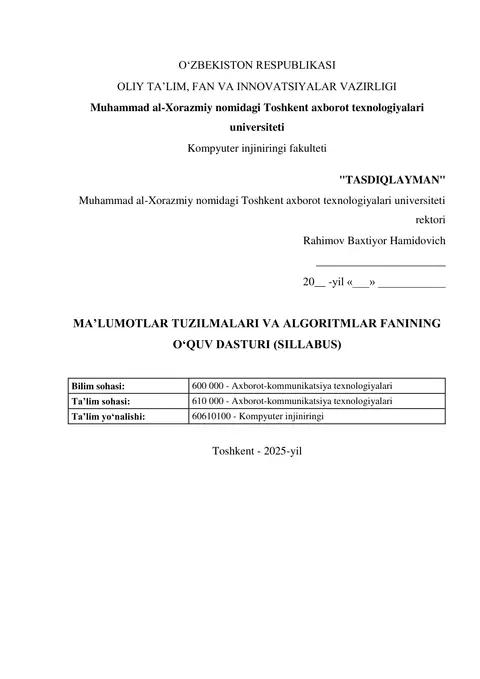
Below is the first page of a real sample: the approval block, the document title and the field-of-knowledge table. Each document follows its own normative basis, and section names and their order are taken from that requirement.
The file is delivered as an editable DOCX: text, tables and headings can be changed freely in Word.
How it works
Fill in the form
Course name, education direction, hours and credits. Most fields are optional.
Make the payment
Each document is paid for separately; the exact price is shown at the payment step. Once the payment is confirmed, the document is generated right away.
Download the Word file
The document is delivered as DOCX and stored in the My Documents section.
Frequently asked questions
Does the document match the ministry and OAK template?
Each document follows its own normative basis — Oʻz DSt 3556:2021, the relevant Nizom, or department practice. Section names and their order are taken from that requirement.
How many documents does one payment cover?
One payment, one document. Each document type is paid for separately, so a second document needs a new payment. The exact price is shown at the payment step.
Can I edit the document myself in Word?
Yes. The file is a plain DOCX — text, tables and headings can be changed freely.
What if the department or university name is wrong?
You enter those fields yourself in the form. If you leave them empty, the document keeps a yellow cell that you fill in inside Word.
How long does the document take?
Usually a few minutes. Once ready, the file is stored in the My Documents section.
What if generation fails after I paid?
The payment is not lost. The document can be generated again; if the problem persists, write to support.
Bought a document before?
Your finished documents are kept in «My documents».
Need a research article for this subject too?
Articles for OAK journals and conference theses are prepared in the Article / thesis section.